SPF, DKIM and DMARC Explained: How They Stop Fake Email
On this page
- Why Fake Email Spoofing Happens Without Email Authentication
- SPF (Sender Policy Framework): The Approved Courier List
- DKIM (DomainKeys Identified Mail): The Tamper-Proof Wax Seal
- What Is DMARC? The Rulebook That Ties Everything Together
- SPF vs. DKIM vs. DMARC: Quick Comparison
- What Happens Step-by-Step When an Email Arrives
- What You See in Your Inbox (and How to Check It Yourself)
- Why Passing Authentication Doesn't Always Mean an Email Is Safe
Having SPF, DKIM, and DMARC explained simply comes down to understanding how your inbox checks a sender's ID card before letting a message through. These three email authentication standards work as a team to prove an email actually came from the domain it claims to be from, stopping scammers from delivering a malicious fake email disguised as your bank, workplace, or favorite online store. In short: SPF verifies the sending server's address, DKIM checks a digital wax seal on the message itself, and DMARC enforces the rules if either check fails.
Why Fake Email Spoofing Happens Without Email Authentication
To understand why we need three separate security layers, it helps to look at how email was originally built. When the Simple Mail Transfer Protocol (SMTP) was designed decades ago, security wasn't built into the foundation. If you want a deeper look at the basics, check out our guide on how email works behind the scenes.
Think of a standard email like a physical letter dropped into a street mailbox. If you take a blank envelope, write your local bank's address in the top-left corner as the return address, and drop it in the mail, the postal service will still deliver it. They look at the destination address, not whether you are truly an employee of that bank.
Email works the exact same way, with one extra twist: every email actually has two "From" addresses.
- The outer envelope address (Return-Path or Mail From): Receiving mail servers use this hidden address to know where to send bounce notifications if a message cannot be delivered.
- The inner letter address (Header From): This is the visible name and email address displayed at the top of your screen when you open your inbox.
Without email authentication, a scammer can rent a cheap server anywhere in the world, type security@yourbank.com into the visible "From" line, and send a phishing message. SPF, DKIM, and DMARC were invented over time to close this dangerous gap.
SPF (Sender Policy Framework): The Approved Courier List
SPF stands for Sender Policy Framework. It was created to stop strangers from using a domain's name without permission by answering a simple question: "Is this specific computer server allowed to send email for this company?"
Every website domain has a public phonebook called the Domain Name System (DNS). With SPF, a company publishes a short text note (a DNS TXT record) listing the exact IP addresses of every server and third-party service—such as their corporate mail host, customer support tool, or newsletter platform—that has permission to send mail on their behalf.
A Simple Analogy for SPF
Imagine a high-security office building receiving daily deliveries from a national pharmacy. The pharmacy gives the building's front desk an official roster of their delivery vans' license plate numbers. When a van pulls up claiming to have a package from the pharmacy, the guard walks outside and checks the license plate against the roster. If the plate is on the list, SPF passes. If the package arrives in an unmarked car that isn't on the roster, SPF fails.
The Hidden Catch With SPF
While SPF is essential, it has two big limitations on its own:
- It only checks the outer envelope: SPF checks the domain in the hidden
Return-Pathaddress, not the visibleFrom:address that you actually see in your email app. A clever attacker could pass SPF using their own throwaway domain on the outer envelope while still writing a famous brand's name on the inner letter. - It breaks when emails are forwarded: If your university or an automatic forwarding rule sends an email on to your personal inbox, the forwarding server's IP address won't be on the original sender's SPF list, causing a false failure.
DKIM (DomainKeys Identified Mail): The Tamper-Proof Wax Seal
To solve the problems that SPF couldn't fix, engineers introduced DKIM, which stands for DomainKeys Identified Mail. Instead of checking which server handed over the message, DKIM answers a different question: "Was this exact message officially stamped by the domain owner, and did anyone tamper with it along the way?"
DKIM uses public-key cryptography. When a legitimate server sends an email, it generates a unique digital signature covering the message body and important headers (like the Subject and From lines) using a secret private key. It attaches this signature as a hidden header called DKIM-Signature. When your inbox receives the email, it looks up the sender's matching public key in their public DNS records to unlock and verify the signature.
A Simple Analogy for DKIM
Think of DKIM as a medieval wax seal stamped onto the folded letter itself using a heavy signet ring that only the king possesses. Anyone who receives the letter can look at a public plaster cast of the king's ring to confirm the seal is genuine. Even better, if a messenger opens the letter in transit and changes a single word, the wax seal cracks and the tampering is immediately obvious.
Why DKIM Matters
Because the DKIM signature travels with the letter rather than depending on the delivery van's license plate, it survives email forwarding intact. As long as the forwarding server doesn't rewrite the message body or subject line, the digital seal remains unbroken. However, just like SPF, DKIM alone doesn't automatically force the domain on the wax seal to match the visible From: address shown to the reader.
What Is DMARC? The Rulebook That Ties Everything Together
If you have ever wondered what is DMARC and why security experts talk about it so much, here is the missing piece of the puzzle. DMARC stands for Domain-based Message Authentication, Reporting, and Conformance. It is the security supervisor that sits on top of SPF and DKIM to make them work as a single system.
DMARC performs three vital jobs that neither SPF nor DKIM can do alone:
1. Identifier Alignment (Closing the Loophole)
Remember how scammers could pass SPF or DKIM using their own shady domain while displaying your bank's address in the visible From: line? DMARC closes that loophole through a rule called alignment. For an email to pass DMARC, the domain name in the visible From: header must match the domain validated by SPF, the domain on the DKIM signature, or both. If the outer envelope says cheap-mailer-123.com and the inner letter says yourbank.com, DMARC alignment fails immediately.
2. Clear Instructions for the Receiving Inbox
Before DMARC, even when an email failed SPF or DKIM, receiving providers like Gmail, Outlook, or Yahoo had to guess what the domain owner wanted them to do with the bad message. A DMARC record lets the domain owner publish a strict policy in their DNS:
p=none(Monitor only): Deliver the email normally, even if it fails, but send a report to the domain owner so they can check if all their legitimate mail servers are set up properly.p=quarantine(Be cautious): Put any email that fails authentication directly into the recipient's spam or junk folder.p=reject(Block completely): Delete or bounce the fake message at the gate so the recipient never even sees it in their spam folder.
3. Automated Feedback Reports
DMARC instructs major email providers to send daily statistical reports back to the domain owner. These reports reveal every IP address in the world trying to send mail using that company's domain—helping security teams spot phishing waves and fix broken configurations.
SPF vs. DKIM vs. DMARC: Quick Comparison
Here is how the three protocols compare side by side:
| Standard | Everyday Analogy | What It Checks | Key Strength | Main Limitation Alone |
|---|---|---|---|---|
| SPF | Approved delivery van license plate list | Sending server's IP address against the Return-Path domain |
Easy to publish; stops unauthorized servers quickly | Doesn't check the visible From: address; breaks on forwarding |
| DKIM | Tamper-proof wax seal on the letter | Cryptographic signature attached to the email header and body | Proves the message wasn't altered in transit; survives forwarding | Doesn't stop a scammer from signing with a different domain |
| DMARC | Security guard's rulebook and ID check | Whether SPF/DKIM pass and match the visible From: domain |
Stops exact-domain spoofing; tells inboxes to quarantine or reject fakes | Requires SPF and/or DKIM to be set up first |
What Happens Step-by-Step When an Email Arrives
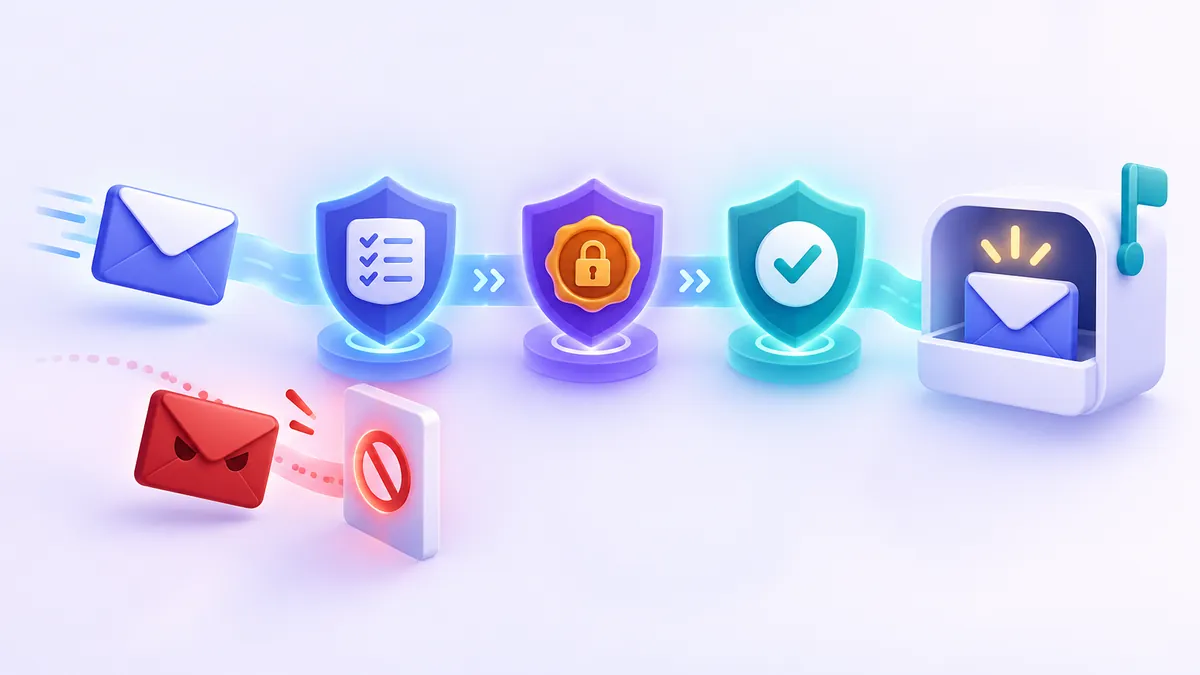
Every time someone sends you an email, your mail provider performs all of these checks in milliseconds before your phone even buzzes:
- The handshake: A sending server connects to your inbox provider and hands over the message.
- The SPF check: Your provider looks at the hidden
Return-Pathdomain, checks its DNS list of approved IP addresses, and marks SPF aspassorfail. - The DKIM check: Your provider finds the
DKIM-Signatureinside the message, fetches the sender's public key from DNS, and verifies that the signature is valid and the text hasn't been changed. - The DMARC check: Your provider looks up the DMARC policy for the domain shown in the visible
From:address. It checks whether SPF or DKIM passed with a matching domain name. - The verdict: If DMARC passes, the email heads toward your inbox (assuming the content itself isn't spammy). If DMARC fails and the sender uses a
p=rejectpolicy, the email is blocked before you ever see it.
What You See in Your Inbox (and How to Check It Yourself)
Most of the time, email authentication works silently in the background. When a company sets up DMARC with a reject policy, spoofed emails claiming to come from that domain simply vanish before reaching you.
When a message comes from a domain with weaker settings or fails part of a check, modern email apps will often show visual warnings:
- Warning banners: A red or yellow bar at the top of the email saying that the sender could not be verified or that the message may be a spoof.
- Question mark icons: Some webmail services replace the sender's profile avatar with a question mark when an email arrives without passing SPF or DKIM.
- "Via" or "Mailed-by" tags: Next to the sender's name, you might see
via mail-service.net. This indicates that the visible domain and the actual sending server belong to two different organizations.
How to check any email in 10 seconds: In most webmail inboxes, click the three dots next to the Reply button and choose Show original or View message source. Look right at the top for a summary table or the Authentication-Results line. You will clearly see spf=pass, dkim=pass, and dmarc=pass for properly authenticated mail. Read our full guide on how to read email headers to check where a message came from for a visual walkthrough.
Why Passing Authentication Doesn't Always Mean an Email Is Safe
Here is the most important rule for everyday internet users: SPF, DKIM, and DMARC prove who owns the sending domain—they do not prove that the sender is a good person.
According to guidance from cybersecurity agencies like CISA and major email providers, scammers regularly work around domain authentication using two common tricks:
- Lookalike (cousin) domains: A scammer cannot spoof
amazon.comif Amazon enforces DMARC. However, the scammer can legally buy a domain likeamaz0n-order-support.com, set up their own perfectly valid SPF, DKIM, and DMARC records for that fake domain, and send phishing emails that pass every technical test with flying colors. - Display name spoofing: Anyone can create a free webmail account, change their display name to "HR Department" or "PayPal Billing," and send an email. The message passes SPF, DKIM, and DMARC for the free webmail provider, hoping you won't tap on the display name to inspect the actual email address underneath.
Because of this, technical checks should always be paired with smart reading habits. Before clicking urgent links or downloading unexpected attachments, review our checklist on how to tell if an email is fake and spot the red flags of phishing.
Protect your real address before spam starts: The easiest way to avoid sophisticated lookalike phishing is to stop handing out your primary email address to every website that asks for it. When you just need to download a file, read an article, or grab a one-time signup code, use a free temporary address from FakeEmail.net instead.
Using a disposable inbox on FakeEmail.net keeps your real address off marketing lists and out of future data breaches. And if you ever wonder how disposable email services fit into the authentication ecosystem, our addresses are strictly receive-only—meaning nobody can ever use a FakeEmail.net address to send outbound spam or spoofed messages (learn more in why temporary email is receive-only). Just remember that temporary inboxes are public to anyone who knows the address and are tied to your browser session, so never use them for banking, work, or accounts you need to keep long-term.
Frequently asked questions
Can an email pass SPF, DKIM, and DMARC and still be a phishing scam?
Yes. SPF, DKIM, and DMARC only verify that the sender genuinely controls the domain name after the '@' symbol. If a scammer buys a deceptive lookalike domain (such as 'support-mybank.com') and sets up authentication records for it, their phishing email will pass all three checks.
Do I need to turn on SPF, DKIM, or DMARC for my personal Gmail, Outlook, or Yahoo account?
No. If you use a free personal email address from a major provider, their engineering teams automatically manage SPF, DKIM, and DMARC for you. You only need to configure these records in your DNS settings if you own a custom domain name (like 'yourname.com') for a business or personal website.
What is the difference between a DMARC quarantine policy and a reject policy?
When a domain owner sets their DMARC policy to 'quarantine' (p=quarantine), emails that fail authentication are still accepted by your mail provider but placed directly into your Spam or Junk folder. When they set the policy to 'reject' (p=reject), your mail provider blocks and deletes the fake email immediately so it never reaches your account at all.
Why does an email say 'via' another domain next to the sender's name?
The 'via' tag appears when a company uses a third-party service (like a newsletter platform or ticketing system) to send email on their behalf, and they have set up SPF for that service but haven't signed the message with their own custom DKIM domain. It isn't necessarily malicious, but it means the third-party platform dispatched the message.
Why doesn't SPF alone stop someone from spoofing my email address?
SPF only checks the hidden 'Return-Path' address that mail servers use for bounced messages, not the visible 'From' address displayed at the top of your email app. You need DMARC alongside SPF and DKIM to require that the visible 'From' address matches the authenticated domain.
Need a disposable address right now? Get one free in a single click — no sign-up.
Get a temp email