How Websites Detect Disposable Email Addresses (And Why)
On this page
- Why Websites Block Disposable Email Addresses
- Can Websites Detect Temporary Email in Real Time? 5 Core Methods
- Comparison of Disposable Email Detection Methods
- Hard Blocks vs. Silent Drops: Why Verification Codes Disappear
- Why Trying to Bypass Detection Is a Bad Idea
- What to Do Instead When a Website Blocks Temp Mail
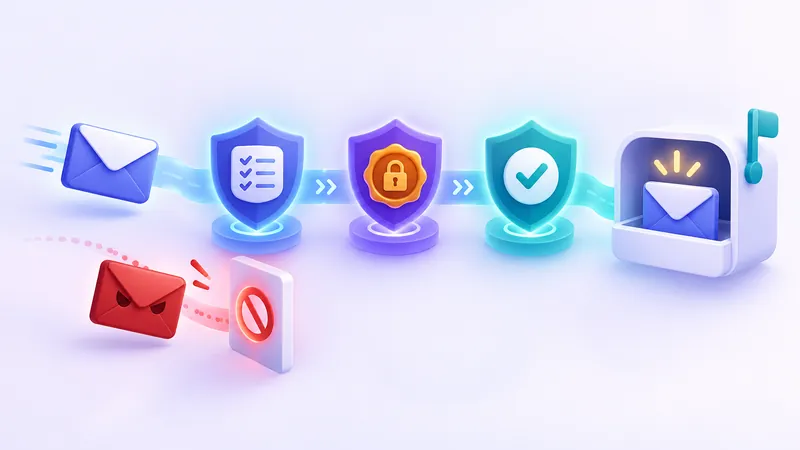
Websites detect disposable email addresses primarily by checking everything after the @ symbol against constantly updated blocklists of known temporary email providers, inspecting the domain's mail server (MX) records, and running real-time validation APIs during sign-up. Because these checks take only milliseconds, a registration form can instantly tell whether an address belongs to a standard mailbox provider or a public temp mail service. When a site flags a disposable email, it will either show an immediate error message asking for a permanent address or silently block the confirmation email from sending.
Why Websites Block Disposable Email Addresses
When you just want to read an article, check a forum, or download a file without handing over your primary inbox, seeing an error message like "Please enter a valid work or personal email address" can be frustrating. However, from the website owner's perspective, blocking temporary addresses is rarely about forcing marketing emails on you—it is usually about basic self-defense and keeping their platform running smoothly.
Running an online service comes with real costs and security challenges. Here are the main reasons why many websites choose to restrict disposable domains:
- Stopping bots and fake accounts: Automated scripts can create thousands of accounts in minutes to post spam comments, manipulate voting systems, or harass other users. Requiring a permanent email address adds friction that slows down mass registration, especially on community forums and social networks (see our guide on whether you should use a temporary email for social media).
- Protecting free trials and promotions: Software companies, streaming platforms, and online stores frequently offer one-time welcome discounts or free trial periods. Without disposable email detection, bad actors could claim unlimited free resources simply by generating a fresh address every week.
- Maintaining sender reputation and deliverability: This is a technical reason most users never see. When a company sends emails to addresses that no longer exist or have stopped accepting mail, those messages "bounce." If a company's bounce rate gets too high, major email providers like Gmail and Outlook may start flagging all of that company's legitimate messages as spam.
- Ensuring account recovery and billing access: If you buy a digital ticket, subscribe to a tool, or set up two-factor authentication, the website needs a reliable way to reach you months later. If you used a short-lived inbox, you will be locked out the moment you forget your password, creating a costly headache for customer support teams.
Can Websites Detect Temporary Email in Real Time? 5 Core Methods
If you have ever wondered how a sign-up form spots a fake email generator the very second you click "Submit," the answer lies in layered verification checks. Most modern websites do not rely on a single rule. Instead, they combine several technical checks that run in a fraction of a second.
1. Public and Commercial Domain Blocklists
The simplest and most common form of disposable email detection is a domain blocklist (sometimes called a denylist). Developers maintain open-source lists on platforms like GitHub containing tens of thousands of known temporary email domains. Whenever a user types an address into a sign-up box, the website strips away the username and checks the domain name against this list.
If the domain matches an entry on the list, the form immediately rejects the input. Many websites download updated versions of these lists automatically every night so their forms stay aware of recently added domains.
2. Mail Server (MX Record) Fingerprinting
Maintaining a list of domain names alone is never enough because temporary email providers frequently register new domain names when old ones get blocked. To catch brand-new domains that are not on any list yet, security tools look deeper into the internet's directory system: the Domain Name System (DNS).
Every domain that receives email must publish public DNS Mail Exchange (MX) records. These records tell the internet which specific mail server handles incoming messages for that domain. Even if a temp mail provider buys 500 brand-new domain names today, all 500 domains will usually point back to the exact same mail server or IP address range. Detection systems simply block the underlying mail server, instantly catching every new domain connected to it.
3. Real-Time Email Validation APIs
Instead of building their own detection tools, thousands of online businesses pay for specialized email verification APIs (Application Programming Interfaces) built into their login systems or customer databases. When you enter an email address, the website quietly queries the API in the background before loading the next page.
These services analyze millions of sign-ups across the web every day. The moment a new disposable domain is used on a few different sites, the API network flags it globally, protecting every other website that uses the same security provider.
4. Domain Age and Registration Patterns
Legitimate email providers and established company domains have typically been registered for years. By contrast, domains used to rotate temporary addresses are often registered just days or weeks before they start seeing heavy traffic. Security systems check WHOIS registration dates and flag newly created domains—especially those using inexpensive top-level domain extensions—as higher risk.
5. Behavioral Signals and Bot Protection
Sometimes, a website does not detect the email domain itself, but rather the way the user interacts with the page. Modern security tools monitor for automated threats to web applications. If you open a sign-up page, paste an address into the field within one second, use a shared VPN IP address that has already created ten accounts that afternoon, and skip straight to the submit button, the site's fraud filter may reject the registration regardless of which email address you entered.
Comparison of Disposable Email Detection Methods
To see how these layers work together, here is a summary of what websites look at when validating an email address during registration:
| Detection Method | What It Inspects | How Fast It Works | Main Strength |
|---|---|---|---|
| Domain Blocklists | The text after the @ symbol against known temp mail lists |
Instant ( happens right in your browser) | Cheap, simple, and catches the most popular public domains immediately |
| MX Server Fingerprinting | The underlying mail server IP and hostname via DNS records | Under 1 second (during form submission) | Catches brand-new disposable domains before they appear on public blocklists |
| Real-Time Validation APIs | Global reputation databases, domain age, and inbox status | Milliseconds via background check | Combines multiple risk signals without the website needing to maintain its own lists |
| Behavioral & IP Scoring | Sign-up speed, IP reputation, and browser environment | Continuous during your page visit | Stops automated account creation and abuse even when real email addresses are used |
Hard Blocks vs. Silent Drops: Why Verification Codes Disappear
When a website detects a temporary email address, it handles the rejection in one of two ways: a hard block or a silent drop.
A hard block happens right on the screen. The input box turns red, and a clear message tells you that disposable addresses are not allowed. While inconvenient, a hard block is honest—you immediately know the site's policy and can decide whether the service is worth giving a permanent address.
A silent drop is much more confusing. The website accepts your temporary email address without complaint and shows a friendly screen saying, "We just sent a verification link to your inbox!" You wait on the temp mail page, where the inbox refreshes automatically, but nothing ever arrives. This happens for two common reasons:
- Anti-bot defense: Some security systems intentionally avoid showing an error message on the sign-up screen so that spammers and automated scripts do not realize their domain has been caught.
- Outgoing mail provider filtering: Even if the website's own registration form accepts your address, the third-party email delivery service the company uses to send transactional messages may automatically suppress delivery to known disposable domains to protect its sender reputation.
If you run into this issue, waiting longer or clicking "Resend" ten times rarely helps. You can learn more about troubleshooting missing messages in our guide on what to do when a verification code is not arriving.
Why Trying to Bypass Detection Is a Bad Idea
When users hit a block, their first instinct is often to search for a brand-new "undetectable" fake email generator or keep clicking the change button to test different domains until one slips through. While it is occasionally possible to find a recently registered domain that has not hit a blocklist yet, relying on this trick for an account you actually want to use almost always backfires.
Warning: Even if a disposable domain slips past a website's sign-up form today, websites routinely run cleanup scripts against updated blocklists later. If your account's email domain is flagged a week or a month after registration, your account may be automatically suspended or locked pending re-verification.
Consider what happens when a site triggers a security check two weeks after you sign up. It sends a mandatory confirmation code to your email address on file. On a service like FakeEmail.net, your addresses and received messages are tied to your browser session (which ends after about two hours of inactivity), and while you can reopen the same username on our available domains with the "Change" button, anyone who knows or guesses that address can also open the same public inbox. Worse, if the website has now blocked that domain, their new security email will never leave their server—leaving you permanently locked out of your account, along with any saved work or purchases.
Furthermore, respecting a website's boundaries is part of responsible internet use. At FakeEmail.net, our Acceptable Use Policy strictly prohibits using our service for fraud, spam, evading bans, or abusing free trials and promotions. Some websites block disposable email domains, and that is entirely their choice. You can read more about where the line sits in our article on whether temp mail is safe and legal, including fair use rules.
What to Do Instead When a Website Blocks Temp Mail
Just because a website blocks public disposable inboxes does not mean you have to hand over your primary personal or work email address and tolerate years of promotional clutter. You have several legitimate, privacy-friendly alternatives that websites readily accept.
1. Use an Email Forwarding Alias (Relay Service)
Unlike a public temporary inbox that requires no registration and is receive-only, an email alias or relay service (such as Apple's Hide My Email, Mozilla's Firefox Relay, DuckDuckGo Email Protection, or dedicated forwarding tools) connects privately to your real inbox. It generates a unique proxy address that forwards incoming mail directly to you.
Because relay services require an authenticated user account and strictly monitor for abuse, many mainstream websites accept them when they block public temp mail domains. Best of all, you stay in full control of the alias for months or years, and if the website starts spamming you, you can turn off that specific forwarding address with one click. Read our full comparison in Email Aliases Explained: Plus Addressing, Relays and Disposable Inboxes.
2. Create a Dedicated Secondary "Sign-Up" Inbox
One of the simplest old-school privacy habits is maintaining two permanent email accounts at a major provider: one strictly for family, banking, work, and vital accounts, and a second "junk-drawer" account specifically for online shopping, loyalty rewards, forums, and software trials. Since the secondary address is hosted on a standard email provider, it will pass every disposable email detection check while keeping your main inbox completely spotless.
3. Use Plus Addressing for Easy Filtering
Most major email providers support sub-addressing, commonly called plus addressing. By adding a plus sign and a keyword before the @ symbol—for example, alex+newsletters@example.com—messages still arrive in your main inbox, but you can set up an automatic filter rule to skip the inbox or route messages from that sender into a separate folder. Note that plus addressing does not hide your real address from the website, so it is best for organization rather than anonymity.
Rule of thumb: Use a free disposable inbox like FakeEmail.net for quick, one-off interactions where you never need the account again—like downloading a public whitepaper, accessing a one-time coupon page, or testing how a sign-up form works. If a site blocks disposable domains, or if you will need to log into the account again next week, switch to an email alias you control.
Frequently asked questions
How does a website know my email address is temporary if I pick a realistic username?
Websites do not judge whether an email is disposable by looking at the username before the @ symbol. Instead, they check the domain name after the @ symbol against databases of known temp mail providers and inspect the domain's underlying mail server (MX) records.
Can a website block my temporary email address after I have already signed up?
Yes. Many websites periodically scan their user databases against updated domain blocklists. If the domain you used is flagged days or weeks later, the website may freeze your account or ask you to verify a permanent email address before you can log in again.
Why did the sign-up form accept my disposable email, but the verification link never arrived?
This is known as a silent drop. Either the website's anti-fraud system quietly ignored the request so bots would not know they were caught, or the company's outgoing email delivery provider automatically refused to send mail to a known disposable domain to protect its sender reputation.
Why do websites allow plus addressing (like name+site@gmail.com) while blocking disposable domains?
Plus addressing still points to a verified, permanent mailbox at a major email provider where one real person is accountable for the account. Public disposable domains require no registration, making them much easier for automated bots to exploit at scale.
What is the best alternative when a website blocks FakeEmail.net?
When a website blocks disposable domains, use an email forwarding alias you control or a dedicated secondary email account at a standard provider. Both options keep marketing clutter out of your primary inbox while providing the permanent reachability the website requires.
Need a disposable address right now? Get one free in a single click — no sign-up.
Get a temp email